
Sheet F — Features
A tray icon, three colours,
and a lot of plumbing.
Everything Greenlight actually does, in roughly the order you will meet it. Nothing here needs a dashboard tab, a seat license or a sales call.
Free while in beta · Windows 10 / 11 · auto-updating · tokens stay in Credential Manager
F-01 — Pull request triage
Every PR that involves you, in one list
- Awaiting your review, authored by you, approved, changes requested.
- Filterable, badged with a count, grouped by state.
- One click opens the PR in your browser, where the actual work stubbornly remains.
- Both providers in one list, because your team never agreed on one and never will.
The filters exist so you can locate the pull request you have been dodging since Tuesday. Greenlight will not review it for you. Greenlight will simply keep it visible, patiently, like a small enamel conscience.
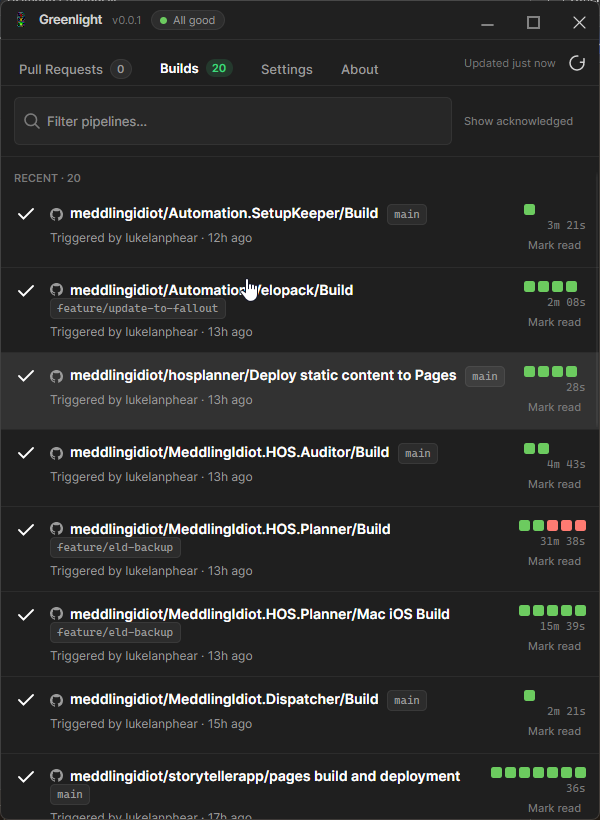
F-02 — Build health
Runs grouped by what needs you
- A history strip per definition, so a flaky pipeline stops being deniable.
- Branch, duration, who triggered it, and who first broke it.
- Mark read to quiet a run; show acknowledged to bring it back.
- A retention window, so last month's failures stop haunting the list.
F-03 — The tray icon
The whole point, in one glyph
Everything passes
Nothing needs you. Suspicious. Go get coffee before somebody notices.
Running, or a review is waiting
Someone wants your opinion. You will give it. It will be ignored.
A pipeline is broken
It worked on your machine. Truly one of the great unsolved mysteries.
Disconnected, or clueless
Same emotional state as your access token on day 91.
F-04 — Notifications and sounds
Toasts you can actually live with
Every event is a separate switch. Failures, recoveries and review requests default to on; every successful build defaults to off, because that way lies madness and a muted notification centre. Point any build event at your own .wav and let the office learn exactly who broke main.
Build failed
onMain is sad. The red lamp is now on. Someone should probably care.
Build recovered
onThe pipeline has stopped crying. For now.
PR assigned to you
onAnother human believes you have opinions. They are not wrong.
Every single success
offMuted by default. Your sanity thanks us.
F-05 — Wire up the quotes
Status updates you can hear from the kitchen
Any status can trigger a .wav. Pick a clip per state, press Play, and imagine it firing at 4:55pm on a Friday. Red is spoken for: “Bring out your dead!”
Assigned .wav
“Yeah, baby, yeah!”
Assigned .wav
“I've got a bad feeling about this.”
Assigned .wav
“Bring out your dead!”
F-06 — Extras
The rest of the panel
X-01
Lamp plugins
A small interface, an isolated load context, and your hardware gets every state change. A misbehaving lamp takes itself down, not the app.
X-02
Settings worth having
Per-connection scopes down to a single pipeline, your own polling interval and retention window, start with Windows, start minimised, single instance, light/dark/system.
X-03
Token hygiene
PATs live in Windows Credential Manager, DPAPI-encrypted per user, keyed by connection. Not settings.json. Not a log. Not tokens_FINAL.txt.
X-04
Read-only, always
Greenlight never merges, approves, cancels or queues anything. It reads. The damage remains entirely manual.
X-05
No telemetry
It talks to your remotes and the update feed. That is the whole list, mostly because writing telemetry sounded like work.
X-06
Deliberately not included
No work items, no boards, no source browsing, no in-app review. It is not replacing your provider's web UI, it is keeping you out of it.
One job, finished.
A tool that does one thing can actually be completed. A platform never is. We prefer finishing things.
Download for WindowsWindows 10 / 11 x64 · installs and updates itself